Siemens' modular add-in for WinCC Unified project analysis and optimization has been updated with...
5 Reasons to Upgrade to TIA Portal V21
TIA Portal V21 delivers new hardware support, expanded HMI capabilities, and productivity tools that directly impact how fast and accurately your team can work. Here's what matters.
What's New in V21
S7-1200 G2 Requires TIA V21, All New WinCC Unified Features Are V21 Exclusive, SIMATIC AX - IT-Style Hardware Engineering, Automatic Change Tracking and User Logging, and more...
1. S7-1200 G2 Requires TIA V21
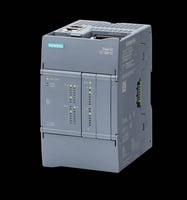
The new S7-1200 G2 CPU running firmware version 4.1 is only configurable in TIA Portal V21. If you're deploying or evaluating the G2 hardware, V21 is not optional — it's a prerequisite.
2. All New WinCC Unified Features Are V21 Exclusive
The latest WinCC Unified capabilities are gated to TIA V21. Engineers working on Unified HMI projects who remain on earlier versions will not have access to current feature releases going forward.
3. SIMATIC AX - IT-Style Hardware Engineering
SIMATIC AX (Automation Xpansion) brings software development practices from the IT world into industrial automation engineering — version control, package management, and collaborative workflows. V21 is the required platform to leverage AX capabilities.
4. Automatic Change Tracking and User Logging
Every project change is automatically logged with a timestamp and username, and navigable via direct object links — a significant improvement for multi-engineer environments and audit workflows.
Settings → Logs → Activate log changes in project → Include user names in logs
5. AI-Assisted Documentation Search
Ask questions directly against TIA Portal documentation and get immediate answers via the integrated chat interface — reducing time spent searching through manuals.
Migration & Compatibility
-
TIA Portal V14 and later projects upgrade directly to V21 — no intermediate migration steps required.
-
Side-by-side installation supported from V13 SP2 through V21 — all project versions remain accessible.
-
The STEP 7 V21 license is backwards compatible to V11 — one license covers your full version history.
Resources & Downloads
Questions About TIA Portal V21?
Contact the EandM team for licensing guidance, download links, and technical details.