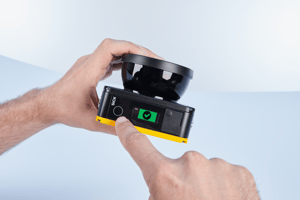
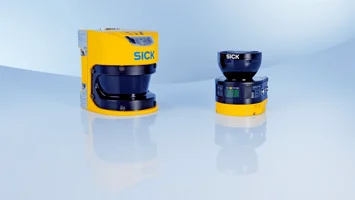
After many years of successful use in countless industries, the S3000 safety laser scanner is now...
The S3000 has been phased out for a year with the S300/S300 Mini phasing out the end of 2026. If you're running any of them, the question isn't if you'll replace them it's how hard the transition is going to be. The most common concerns we hear: reworking all the wiring, dealing with mounting mismatches, and rebuilding configurations from scratch.
SICK addressed all three. The S3000 succeeds to the microScan3; the S300 and S300 Mini succeed to the nanoScan3. Here's how the migration tools work and which situations each one covers.
.png?width=500&height=281&name=Spooky%20newsletter%20header%20%20(7).png)
Mechanical · S3000 → microScan3
Mechanical Adapter — Reuse Your Existing Mounting
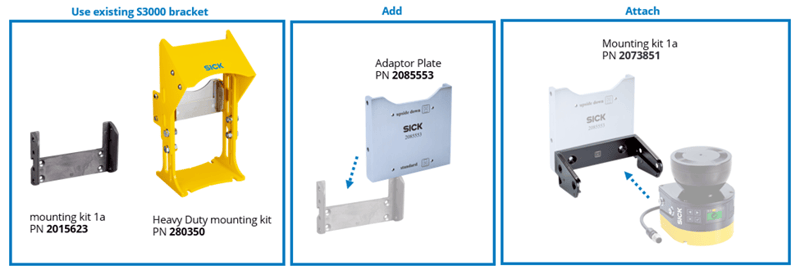
PN 2085553 · Bridges S3000 mounting positions to the microScan3 footprint · Contact EandM for pricing
The microScan3 is physically smaller than the S3000. That's usually a benefit — but it creates a mismatch when your mounting infrastructure was built around the S3000's dimensions. Without an adapter, you're drilling new holes, fabricating brackets, or modifying machinery.
The Mechanical Adapter lets the microScan3 drop directly into existing S3000 bracketry and keeps the already established laser scan plane with the new microScan mounts. No need to take out old bracketing and no need to drill any new holes.
Electrical · S3000 → microScan3
Electrical Adapter — Keep Your Existing Wiring
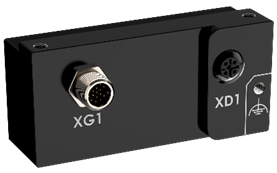
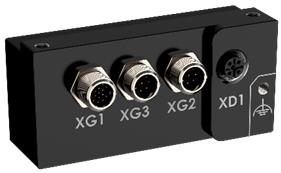
Rewiring was where S3000 replacements gets complicated, especially when working with the S3000 to the microScan Pro I/O. The pinouts and cabling on the microScan are much more streamlined compared to the intentional cable gland wiring of the S3000. At the beginning of the phaseout, machine wiring had to be fully reworked to correctly connect them, but SICK has introduced an electrical adapter to offer plug-and-play connections. No rewiring required.
The Electrical Adapter connects directly to your existing S3000 System Plug, so your current cabling stays in place. From the adapter, standard M12 cables run to the microScan3 Pro I/O, fully connecting your machine to your new microScan3 with little hassle. We have two variants of the adapter:
|
Variant |
Use when… |
|
P/N 1150808 |
For use with static inputs or with no field switching used |
|
P/N 1150809 |
For use with encoder inputs and dynamic field switching |
Standard M12 cables are widely available, which keeps sourcing those simple. If you're unsure which variant applies, feel free to connect with us and we can walk through your application.
Software · All three scanners
CDS → Safety Designer — Transfer Your Configuration
Covers S3000 → microScan3 and S300 / S300 Mini → nanoScan3 · Free download at sick.com
This is the one that saves the most time on complex installations. It covers all three discontinued scanners. The S3000, S300, and S300 Mini all run on CDS; their successors (microScan3 and nanoScan3) all run on Safety Designer which is a completely different platform. Rebuilding fields, contours, field sets, and monitoring cases from scratch is where migrations typically can get very cumbersome.
The CDS to Safety Designer is free downloadable software that provides a structured transfer of your existing configuration.
The core workflow: CDS files (configurations saved or pulled from phased out scanners), are converted using CDS-to-Safety Designer to an SGEXML file. The SGEXML file can then be imported into a new safety laser scanner or on a Safety Designer project file whereas much relevant data is added to the project file. The bulk of configuration settings will be completely moved over, only requiring reconfiguration of I/O logic and certain device information. Do note it’s best-case practice to check and reverify all scanner settings to ensure everything has been imported as intended.
A real-world example of these tools working to create an easy upgrade solution:
DS Smith migrated twenty S3000 scanners across ten AGVs in Denmark. Working with an S3000 Professional + S3000 Remote and moving to a microScan3 Pro I/O EFI-Pro was simple:
- The adapter plate made physical retrofitting easy, keep the same scan plane and reusing the current mounting set-up.
- CD-to-Safety Designer automatically transfers much of the S3000 configurations to the microScan3.
- The smaller size and standardized M12 connections of the microScan3 compared to the S3000 made install much easier.
Still haven’t looked into phasing out your current S3000 or S300/S300 Mini?
Sick has included a nifty S3000 phaseout selector that helps you outline how your safety upgrade would be like asking of your current phased-out safety scanner, how you integrate them into your system, then provides an outline of how to introduce the microScan or nanoScan into your system. You could then connect with a trusted distributor to iron out the details.
Learn more about the nanoScan3 and microScan3 in the video here.
The only SICK Elite Gold Distributor on the West Coast
Elite Gold is the highest level of recognition a SICK distributor can achieve. It means we're not just a reseller — we're a certified partner with deep product knowledge, West Coast inventory on hand, and a team that's worked through migrations like this one many times before.
Let's figure out the right path for your setup.
Whether you're migrating one scanner or dozens, we can help you identify which adapters apply, walk through the configuration transfer process, and make sure you have the right parts in hand. Reach out to the EandM team to get started.
-1.png?height=200&name=Spooky%20newsletter%20header%20%20(6)-1.png)